Pulse Building
In this example:
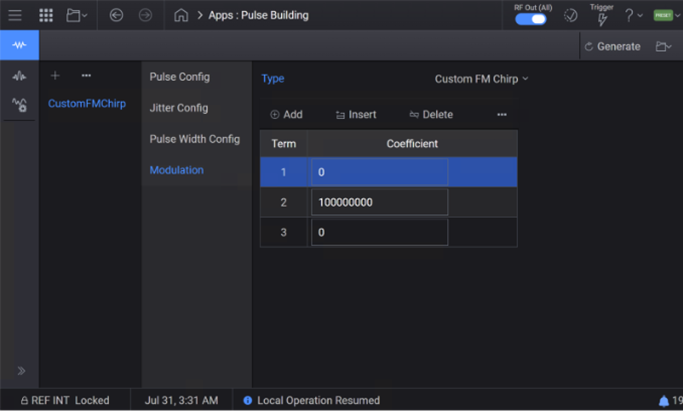
A 3 µs pulse is run with an applied custom FM chirp.
The center frequency is set to 10 GHz, and the frequency sweep is from 10 GHz to 10.3 GHz.
The values of the coefficients for the custom FM chirp are as shown in the following screen.
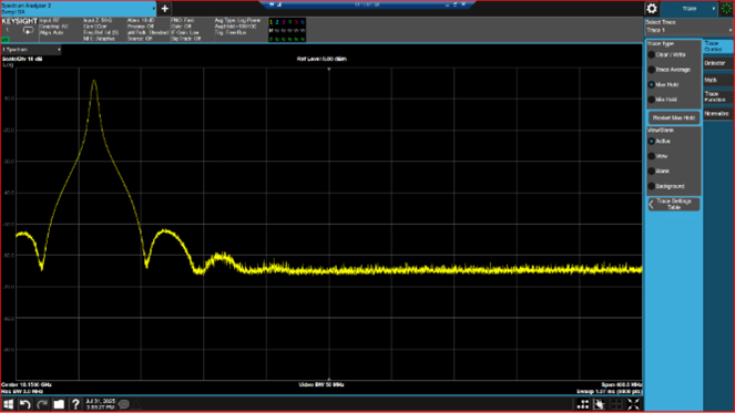
Set the center frequency to 10.15 GHz (the midpoint between 10 GHz and 10.3 GHz).
Set the span to 400 MHz to cover the entire frequency sweep.
Set the trace points to 8000 to achieve sufficient resolution across the span.
Navigate to the Trace tab.
Set the Trace Mode to Max Hold.
The complete frequency sweep for this example is displayed.